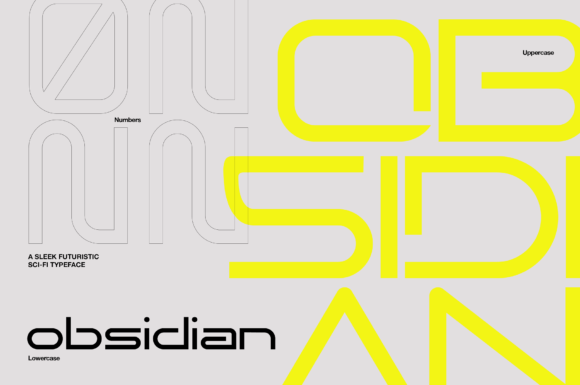
Obsidian: A Futuristic Font for Modern Design Workflows
Obsidian is a sleek, sci-fi-inspired sans serif display font that brings a clean and futuristic aesthetic to any typographic project. Designed with versatility in mind, it works seamlessly across a range of applications—from digital headlines and editorial layouts to branding materials, packaging, and even movie titles. Whether you're a designer, marketer, or content creator, Obsidian can elevate your visual communication by delivering a bold yet refined presence.
Understanding the Role of Obsidian in Design
In design, typography plays a critical role in shaping the tone, mood, and clarity of a message. While many fonts are limited in their use cases, Obsidian stands out due to its ability to adapt while maintaining a strong identity. It’s not just another font; it's a tool that integrates into the broader creative process, offering both form and function.
Owing to its minimalist structure and geometric precision, Obsidian fits well into modern design systems. It supports readability without sacrificing style, making it ideal for projects where visual impact matters as much as legibility. Its neutral yet advanced character set allows it to complement other typefaces, ensuring harmony in complex layouts such as magazines, websites, or product packaging.
Pre-Project Considerations
Before incorporating Obsidian into your workflow, it's essential to consider its intended use. Ask yourself whether the project requires a high-impact headline or more subtle body text. Since Obsidian is a display font, it shines most when used for larger sizes—think banners, logos, or social media posts—where it can command attention without overwhelming the viewer.
You should also evaluate the color schemes and imagery that will accompany the text. The stark contrast and futuristic edge of Obsidian work especially well with dark backgrounds, neon accents, or high-tech visuals. This synergy between typography and design elements helps create cohesive brand experiences or engaging editorial content.
Integrating Obsidian into Your Creative Workflow
Once you've decided on using Obsidian, the next step is integrating it into your existing tools and platforms. Most design software, including Adobe Photoshop, Illustrator, InDesign, Figma, Canva, and web development environments like CSS frameworks, support custom font installations. You’ll typically download the font files and install them through your system settings before accessing them in your preferred application.
If you’re working digitally, ensure that the font is properly embedded when exporting assets. For web developers, using @font-face in CSS ensures cross-browser compatibility and gives control over how the font behaves on different devices. Always test the font in multiple contexts—desktop, mobile, print—to confirm its performance and consistency.
Using Obsidian in Branding and Editorial Projects
For branding initiatives, Obsidian can serve as a cornerstone of your visual identity. It pairs well with photography, abstract shapes, or technical illustrations, helping establish a modern and innovative brand image. When designing logos or promotional materials, start by defining the hierarchy: use Obsidian for headlines or taglines, then pair it with a complementary body font for supporting text.
In editorial design, such as magazine spreads or blog headers, Obsidian adds a touch of sophistication. Use it sparingly for section headings or pull quotes to guide the reader's eye without disrupting the flow of the article. For example, a tech blog might use Obsidian for article titles and subheadings, creating a consistent theme across all issues.
Apparel and Packaging Applications
Obsidian isn’t limited to digital screens—it thrives on physical products too. Apparel designs, from t-shirts to jackets, benefit from its bold and minimal look, which translates well into screen printing or embroidery. Likewise, product packaging can leverage the font to communicate innovation or luxury, depending on the context. The key here is to balance the font size and spacing to avoid clutter, especially on smaller surfaces like labels or tags.
To implement Obsidian effectively in these areas, always check the resolution and scalability of the font when exported. High-resolution formats like EPS or SVG are best suited for professional printing, while PNGs or JPEGs work for quick online mockups. Keeping a consistent use of the font across all merchandise ensures brand recognition and a unified customer experience.
Collaboration and Cross-Platform Compatibility
When working in teams or sharing files across platforms, compatibility becomes a priority. Ensure that all collaborators have access to the same version of Obsidian to maintain consistency. Cloud-based tools like Google Fonts (if available) or internal asset libraries can help streamline this process.
Obsidian also integrates smoothly with vector-based tools, allowing designers to manipulate individual characters or apply effects like gradients, shadows, or outlines. This flexibility makes it suitable for layered compositions, where typography serves as both information carrier and visual element.
Workflow Tips for Maximum Efficiency
- Use font pairing tools: Experiment with combinations of Obsidian and other fonts to find a balanced typographic rhythm. Tools like Adobe Typekit or FontPair.co can offer suggestions based on style and weight.
- Stay organized: Maintain a centralized font library or naming convention for Obsidian to avoid confusion, especially when managing multiple projects or revisions.
- Test across mediums: Preview your designs on various platforms—mobile, desktop, print—to see how Obsidian performs under different conditions.
- Optimize for accessibility: Even though it’s a display font, make sure there's enough contrast against the background to meet accessibility standards.
Long-Term Use and Quality Control
Over time, maintaining quality and consistency becomes part of the design process. If you're using Obsidian frequently, consider setting up style guides or templates that define its usage parameters. These documents can include font weights, spacing rules, and recommended colors, ensuring everyone involved adheres to the same standards.
Also, be mindful of licensing agreements. Depending on your needs—personal use, commercial projects, or redistribution—choose the appropriate license to avoid legal complications. Many foundries provide detailed terms, so review them carefully before finalizing your implementation.
Automating Repetitive Tasks
Obsidian is particularly useful in repetitive workflows, such as generating social media graphics or updating website headers. By setting up reusable templates with predefined styles, you can reduce decision fatigue and speed up production. This is especially valuable for marketers or bloggers who need to publish regularly but still want to maintain a polished aesthetic.
Tools like Figma plugins or After Effects scripts can automate the insertion of text using Obsidian, saving time while keeping your output visually aligned. Pair automation with manual checks to ensure that each piece remains unique and tailored to its specific audience.
Real-World Examples and Observations
Consider a case where a startup launches a new app focused on productivity. They choose Obsidian for their logo and promotional materials because it reflects their forward-thinking approach. The font appears on landing pages, email campaigns, and even in-app notifications, reinforcing the brand’s identity at every touchpoint.
Another scenario involves an independent filmmaker using Obsidian for title sequences and credits. The font’s clean lines and futuristic vibe align perfectly with the film’s cyberpunk theme. It’s applied consistently across posters, trailers, and festival submissions, contributing to a memorable visual language.
These examples highlight how Obsidian functions beyond aesthetics—it becomes part of the storytelling and user experience. Its adaptability ensures it can be deployed early in the planning phase, during execution, or even in post-production stages, depending on the project's requirements.
Combining Obsidian with Other Assets
Obsidian complements a wide array of design assets. When paired with high-quality images, it enhances the narrative rather than competing with it. In video editing, the font can appear in lower thirds, captions, or animated transitions, adding a sense of professionalism and polish.
Additionally, when used alongside icons or infographics, Obsidian maintains a clean interface, preventing visual overload. This makes it particularly effective in presentations, dashboards, or educational materials where clarity is crucial.
Practical Advice for Everyday Use
Here are some actionable tips to help you get the most out of Obsidian in your daily work:
- Start small: Test Obsidian in low-stakes projects first, like social media thumbnails or personal blogs, to understand its behavior before applying it to high-visibility work.
- Layer wisely: If you're using effects like drop shadows or strokes, apply them conservatively to keep the font’s sharp edges intact.
- Monitor readability: Even though Obsidian looks great, avoid using it in long paragraphs or small print unless absolutely necessary.
- Backup font files: Store your font files securely, either locally or in a cloud-based folder, to prevent disruptions in your workflow.
- Keep learning: Follow design trends and observe how others are using similar fonts. This can inspire new ways to incorporate Obsidian creatively.
Future-Proofing Your Typography Choices
Choosing a font like Obsidian means investing in a typographic solution that won’t feel outdated quickly. Its clean and minimal design aligns with current trends in UI/UX, branding, and motion graphics, making it a future-proof option for professionals who value longevity in their assets.
Moreover, as digital experiences evolve, the demand for fonts that work well on high-DPI screens and mobile devices increases. Obsidian’s crisp rendering and responsive design capabilities make it a reliable choice for creators aiming to stay ahead of the curve.
Conclusion
Obsidian is more than just a stylish font—it's a versatile tool that enhances the effectiveness of your design decisions. From branding to web design, it offers a clean, minimal, and futuristic look that resonates with modern audiences. By understanding its strengths and limitations, and integrating it thoughtfully into your workflow, you can leverage Obsidian to create compelling, professional results.
Whether you're launching a product, crafting a website, or producing a poster, take the time to explore how Obsidian can contribute to your overall vision. With proper planning, testing, and collaboration, this font can become a staple in your toolkit, delivering both impact and clarity in every project it touches.