High and Low: The Display Font That Elevates Your Design Game
Typography plays a crucial role in visual communication. Choosing the right font can make your design stand out, convey emotion, and enhance readability. High and Low is a display font that has been gaining attention for its contemporary aesthetic and versatile application. With its bold, fresh style, it’s ideal for logos, headlines, posters, and any project where you want to create a strong visual impact. However, while High and Low may look cool and trendy at first glance, using it effectively requires more than just downloading and applying it to every text element. In this article, we’ll explore what makes High and Low special, common mistakes people make when using it, and how to avoid them to ensure your designs are both stylish and functional.
What Is High and Low?
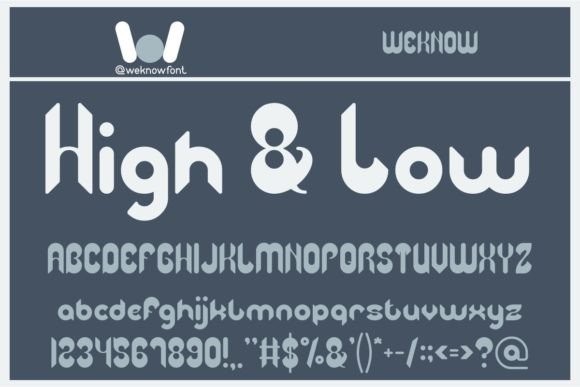
High and Low is a modern display typeface known for its expressive contrast between thick and thin strokes. It combines clean lines with a dynamic feel, making it visually appealing for both digital and print media. Unlike standard sans-serif or serif fonts used for body text, High and Low is designed to draw attention and communicate personality — which is why it works best for short, impactful text rather than long paragraphs.
Why People Love It
- Its unique character shapes give it an edge over generic fonts.
- The high-contrast strokes add a sense of elegance and flair.
- It pairs well with minimalist layouts, creating a strong focal point.
- Designers appreciate its ability to elevate branding materials like logos and taglines.
Common Mistakes When Using High and Low
Despite its popularity, many designers misuse High and Low, leading to suboptimal results. Here are some of the most frequent errors:
Using It for Body Text
Display fonts like High and Low are not optimized for reading large amounts of text. Their exaggerated contrasts and stylized letterforms can cause eye strain if used in menus, articles, or web copy. This mistake often leads to poor user experience and reduced engagement, especially on mobile devices where screen space is limited.
Mismatched Pairings
A second common error is pairing High and Low with other fonts that clash in tone or style. For instance, combining it with another highly stylized script font might overwhelm the design, whereas a neutral sans-serif could balance it better. A mismatched font stack can confuse viewers and dilute the message you're trying to deliver.
Ignoring Kerning and Spacing
Due to its dramatic stroke weights, the spacing between letters (kerning) in High and Low can appear uneven or awkward if not adjusted properly. Many users overlook manual kerning, assuming the default settings are sufficient. As a result, their designs may look unprofessional or poorly crafted.
Overusing Effects
Some designers try to compensate for the font’s boldness by adding excessive drop shadows, gradients, or outlines. While these effects can be useful in moderation, they often lead to cluttered visuals that distract from the main content. Less is usually more when working with a striking font like High and Low.
How These Errors Impact Your Work
Choosing the wrong use case for High and Low can significantly affect your design’s overall effectiveness. For example, using it inappropriately for body text can reduce legibility, leading to disengaged audiences. Poor font pairings might make your layout look amateurish, undermining your brand's credibility. Similarly, neglecting typography details like spacing can make even a simple headline appear unbalanced or hard to read.
Real-World Examples
- Logo Design: A startup logo using High and Low without proper spacing looked rushed and unpolished. After adjusting the letter spacing and choosing a complementary supporting font, the logo appeared cohesive and professional.
- Web Header: A blogger applied High and Low as the primary heading font across multiple pages. Readers found it difficult to scan quickly due to inconsistent spacing. The solution was to adjust the tracking and limit its use to key headlines only.
- Poster Layout: A marketing team used High and Low for both title and body copy in a promotional poster. The result was overwhelming and unreadable. Replacing the body text with a clean sans-serif improved clarity and made the design more effective.
Practical Tips for Using High and Low Effectively
To get the most out of High and Low, consider the following guidelines:
Stick to Short Text Elements
Use High and Low for titles, headings, slogans, and logos. Avoid using it for long blocks of text such as paragraphs, captions, or form fields. This ensures that your audience can easily process the information without being distracted by the font’s style.
Choose Complementary Fonts
Pair High and Low with a secondary font that complements its characteristics. A good rule of thumb is to match a bold display font with a clean, neutral sans-serif or serif for body text. For instance, pairing it with Helvetica or Georgia can help maintain a balance between style and readability.
Adjust Kerning and Tracking
Because of its contrasting strokes, High and Low may require manual adjustments to improve visual harmony. Use your design software’s kerning tool to fine-tune letter spacing, particularly in short phrases or logos. Proper tracking will also help in achieving a consistent rhythm across the text.
Limit Stylistic Effects
While effects like gradients or shadows can enhance the appearance of High and Low, they should be used sparingly. Stick to subtle treatments like light outlines or soft shadows to highlight the font’s natural beauty without overpowering it. Remember, the goal is to let the font speak for itself.
Consider Color Contrast
High and Low shines brightest against a solid background with high contrast. If you’re using it on a complex or gradient-filled background, test different colors to ensure the text remains legible. Sometimes, a simple white or black font is all you need to make a statement.
Before You Download or Buy High and Low
Here are a few things to check before committing to High and Low for your next project:
- License Terms: Ensure the font license allows for commercial use if your project involves clients or revenue generation. Some free versions restrict usage to personal projects only.
- Character Set: Confirm that High and Low includes the characters and symbols you need. Some display fonts lack support for extended Latin, Greek, or Cyrillic scripts.
- Format Compatibility: Verify whether the font is available in OTF, TTF, or WOFF formats depending on your platform (desktop, web, or app-based).
- Test It Out: Before finalizing your design, preview the font in various sizes and contexts to see how it performs under different conditions.
Better Approaches to Incorporate High and Low
Instead of forcing High and Low into every design, consider the following strategies:
Layer It with Texture
Enhance the font’s visual appeal by adding textures or subtle grain overlays. This technique gives your design depth and warmth without altering the font’s integrity.
Use It in Branding Collateral
High and Low is excellent for logos, business cards, and social media headers. These elements benefit from its bold presence and can reflect your brand’s identity effectively.
Combine with Negative Space
Allow plenty of negative space around the font to emphasize its design. Crowded layouts can diminish its impact, so give it room to breathe for maximum effect.
Final Thoughts on High and Low
High and Low is a powerful display font that can transform your creative projects when used correctly. Its modern and fresh appearance makes it a favorite among designers looking to add a touch of sophistication and originality. However, like any typographic choice, it requires thoughtful application to avoid common pitfalls. By understanding its strengths and limitations, and following best practices for typography, you can ensure your designs remain both stylish and readable. So, before you hit "download," take a moment to assess how High and Low fits into your project’s needs — and remember that great design is about balance, not just aesthetics.