Buckary: A Stylish, Intricate Font for Bold Design Statements
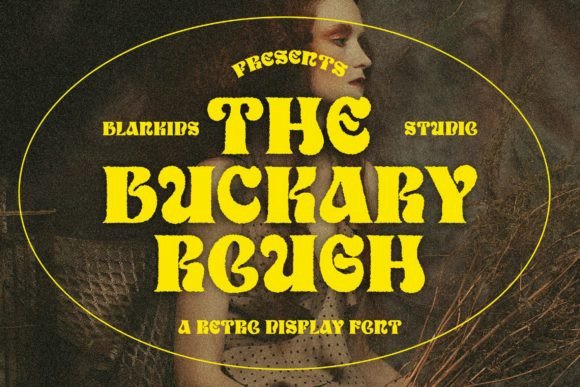
Fonts are more than just tools for conveying text—they’re visual elements that shape the tone, clarity, and impact of your design. Among the many options available, Buckary stands out as a retro display font with character. Its uniquely shaped letters bring a sense of vintage charm and sophistication to any project. Whether you're designing a poster, branding a product, or crafting an eye-catching headline, Buckary can elevate your work from ordinary to extraordinary. But like any powerful design tool, it needs to be used wisely. Here’s what you should know before adding Buckary to your creative toolkit.
Why Choose Buckary?
Buckary is not your average font. It's a display font, meaning it's designed for short bursts of text rather than long paragraphs. This makes it ideal for headlines, logos, banners, and other attention-grabbing elements. Its intricate details and stylized characters give it a distinctive personality—perfect for projects that aim to stand out in a crowded digital space.
The retro vibe of Buckary is particularly appealing in today’s design landscape, where nostalgia-driven aesthetics are on the rise. From vintage-inspired posters to modern minimalist logos with a twist, this font offers a unique blend of old-world elegance and contemporary appeal. For designers who want to make a strong visual statement without overcomplicating their layout, Buckary is a compelling choice.
Who Can Benefit from Using Buckary?
- Graphic designers looking for standout typography in editorial layouts or promotional materials.
- Brands aiming to create a retro or artisanal identity.
- Bloggers and content creators wanting to add flair to headers or infographics.
- Small business owners creating packaging, signage, or social media assets.
Common Mistakes When Choosing and Using Buckary
While Buckary is visually striking, there are several common mistakes that users make when selecting or applying it. These errors can lead to readability issues, poor user experience, or even miscommunication of your message. Let’s explore them and how to avoid them.
Using Buckary in Body Text
One of the most frequent misuses of display fonts like Buckary is trying to use them for body text. Display fonts are typically ornate and have less contrast between letterforms, making them difficult to read in large quantities. If you apply Buckary to a paragraph of copy, especially at smaller sizes, it can become a barrier to communication rather than an enhancement.
Better approach: Reserve Buckary for headlines, titles, and short phrases. Pair it with a clean, legible sans-serif or serif font for body text to maintain balance and ensure your message remains accessible.
Ignoring Kerning and Spacing
Buckary's stylized characters often come with built-in spacing that works well in most cases—but not always. Sometimes, the default kerning (the space between specific pairs of letters) may look off in certain applications. Users might overlook this and end up with awkwardly spaced words that distract from the overall design.
Better approach: Always check and adjust the spacing manually if needed. Most design software allows for fine-tuning of individual letter spacing. A quick pass through your text with the “kerning” tool can significantly improve the visual harmony of your design.
Forgetting to Consider Backgrounds and Colors
Buckary’s intricate shapes and strokes can easily get lost or overwhelmed by busy backgrounds or inappropriate colors. Some users don’t test the font against different background textures or hues, leading to designs that lack clarity or aesthetic cohesion.
Better approach: Always preview Buckary on various background types before finalizing your design. Use high-contrast color combinations (like dark text on light backgrounds or vice versa) to keep the details visible. Avoid using gradients or patterns that compete with the font’s own visual complexity.
Overlooking Licensing and Usage Rights
It’s easy to get excited about a new font and forget to review its licensing terms. Buckary, while widely loved, has specific usage rights depending on whether you downloaded it from a free source or purchased a commercial license. Many users unknowingly violate these terms, which can result in legal complications, especially for professional or published work.
Better approach: Before downloading or using Buckary, visit the official source or platform where you obtained it and carefully read the licensing agreement. Make sure you understand the permissions for commercial use, redistribution, and web embedding if necessary.
How to Get the Most Out of Buckary
To truly harness the potential of Buckary, consider the following tips and tricks that help maximize its impact while minimizing common pitfalls.
Pair It Thoughtfully
Buckary is bold and expressive, so pairing it with another equally dominant font can create visual chaos. The key is to find complementary typefaces that enhance rather than compete with Buckary’s personality.
Example: Pair Buckary with a simple sans-serif like Montserrat or Lato for a balanced look. Alternatively, match it with a slightly more decorative but still readable font such as Playfair Display for a harmonious contrast.
Use It Sparingly
Even the most beautiful fonts can lose their effectiveness if overused. Applying Buckary across every heading or title in a project can dilute its impact and make the design feel cluttered.
Solution: Use Buckary only where it adds value—such as in a main headline or logo. Apply simpler fonts for subheadings and supporting text to maintain hierarchy and visual rhythm.
Test It at Different Sizes
Display fonts like Buckary often behave differently at various sizes. What looks great at 72pt may appear too heavy or unclear at 24pt. Testing the font across multiple scales ensures it performs well in all intended contexts.
Example: Try using Buckary in a 48pt title versus a 16pt call-to-action. You’ll likely find that the smaller size lacks definition and may require subtle adjustments in weight or tracking.
What to Check Before Committing to Buckary
Before you finalize a design using Buckary, take a moment to evaluate a few critical factors. This will help you avoid last-minute revisions or rework due to overlooked details.
- Readability: Does the font remain legible at the intended size? If not, reconsider its placement or choose a similar but more scalable alternative.
- Licensing: Are you allowed to use Buckary for your specific project? If you're unsure, contact the font foundry or consult a legal resource.
- Contrast and Legibility: Is the text clearly visible against the chosen background? Adjust opacity, color, or stroke if needed.
- Character Set: Does Buckary include all the special characters and symbols you need? Missing glyphs can disrupt the flow of your message.
- Device Compatibility: Will your design render correctly across different screens and devices? Test it on both desktop and mobile to confirm.
Realistic Examples of Buckary in Action
Let’s look at some real-world scenarios where Buckary shines—and where it might fall short.
Good Use: Vintage-Themed Poster
A local bakery is launching a retro-themed campaign for their anniversary. They use Buckary for the headline “50 Years of Sweet Traditions,” paired with a soft cream background and warm brown accents. The result is nostalgic, inviting, and perfectly aligned with the brand’s identity.
Poor Use: Website Navigation Menu
An online store decides to use Buckary for their website navigation bar. While the font looks fantastic in the hero section, it becomes hard to read in the menu, especially on mobile. Visitors struggle to locate categories, leading to higher bounce rates and lower engagement.
Better approach: Use Buckary for the site’s main banner and switch to a more functional font like Open Sans or Roboto for navigation and body text.
Alternatives to Consider
If you love the style of Buckary but aren’t sure it’s the right fit for your project, here are some alternatives worth exploring:
- Playfair Display: Offers a similar vintage feel but is optimized for longer text.
- Great Vibes: Another elegant script option with a rich, artistic character.
- Oswald: A modern geometric sans-serif that contrasts well with display scripts like Buckary.
These fonts can provide similar stylistic benefits while offering better scalability or functionality in different contexts.
Final Thoughts on Using Buckary Effectively
Buckary is a versatile and stylish font that can transform your designs when used appropriately. However, its beauty comes with responsibilities. Understanding its limitations, testing its performance, and respecting licensing agreements are essential steps in ensuring it serves your purpose effectively.
By avoiding common mistakes and applying thoughtful design principles, you can integrate Buckary into your work in a way that enhances rather than hinders your message. Remember: the best typography doesn’t just look good—it communicates clearly and supports the overall intent of your design.
So next time you reach for a display font, ask yourself: does Buckary add value here, or could it cause confusion? With careful consideration, you'll make choices that reflect both your creativity and professionalism.